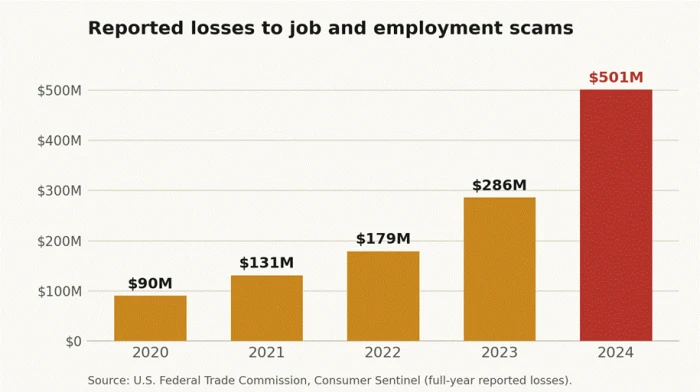
$501M Reported to the FTC for job and employment scams in 2024, up from $90M in 2020. | 3x The rise in reported job scam losses across 2020 to 2024, per FTC data. |
30+ Trusted brands cloned in a single recruiter phishing net tracked through 2026. | 4 Fake verification screens one kit used to walk around two-factor login. |
There is a specific kind of email worth learning to hate. It is warm and specific. It uses your name, it names a company you would be flattered to work for, and it does not ask for money. Money is the tell everyone has been trained to spot, so the smarter operators dropped it. What this new wave of job scams wants is quieter and worth far more: the username and password to an account you already own. Your Google Workspace login. Your Microsoft 365. Your Facebook. One good password, harvested through a page that looks exactly like the real sign-in screen, and the person on the other end owns a slice of your digital life.
Consider one that fooled a communications manager who spots junk mail for a living. The lure was a marketing role. The scheduling page looked like a normal booking link. The sign-in box at the end looked like Google down to the padlock. She typed her work password, then typed the six-digit code her phone buzzed with, and by the time the screen said the meeting was confirmed, both had already been relayed to a stranger's server. She did nothing careless. That is the part worth sitting with, because the same setup is landing in inboxes every day.
THE SHORT VERSION The fastest-growing job scams are not asking for a fee anymore. They are phishing your logins by posing as recruiters at real companies, and the best of them can defeat two-factor authentication in real time. No honest hiring process ever needs your existing email or social password. If a recruiter's link ends at a sign-in box, that is the scam, no matter how convincing the page or how badly you want the job. Verify the role on the company's own careers site, and treat any unrequested “log in to continue” as a stop sign. |
What a login-only job scam actually is
It is a phishing attack wearing a recruiter's clothes. The bait is a job. The payload is a fake sign-in page. The goal is your credentials, not a wire transfer.
Traditional job scams went after your wallet directly, through fake training fees, equipment deposits, or the task schemes where you pay to unlock earnings you supposedly made. Those still exist, and the FTC says reports of them tripled between 2020 and 2024. But a parallel branch has grown up beside them, and it pays better. A stolen corporate login opens email, shared drives, internal calendars, and a trusted identity to attack coworkers with. A stolen social login opens private messages, linked services, and every contact you have. None of it requires the victim to send a cent.
How the fake recruiter login scam works
Nearly every documented version runs the same four beats. The order matters, because each step lowers your guard for the next one.

| 1 | The warm, specific hook An email or LinkedIn message that names you, names your current title, and names a company worth taking seriously. It offers an interview, not a job, which feels reasonable. There is a soft deadline: pick a time this week. |
| 2 | The legitimate-looking detour You click through to a booking or careers page. The better campaigns route you through real services first, a genuine scheduling tool or marketing platform, so the web address and security checks look normal before you reach anything hostile. |
| 3 | The sign-in that should not be there To confirm the slot or complete the application, you are asked to sign in with Google, Microsoft, or Facebook. The box mimics the real one exactly. In the slickest kits it is a fake browser window drawn inside the page, padlock and address bar included. |
| 4 | The live relay Your password is sent to the attacker instantly. If two-factor is on, the page asks for your code, then feeds it into the real login within seconds while the code is still valid. You see a meeting confirmed screen. They see your account. |
Why job seekers are the perfect target right now
Scammers follow the crowd, and the crowd is in the job market. Employers cut more than 1.17 million jobs in 2025 by the count Malwarebytes cited, the heaviest year since the pandemic, and unemployment climbed to a four-year high before hovering in the low four-percent range into early 2026. That is a very large pool of people expecting messages from strangers, used to filling in forms, and motivated enough by a good opening not to argue with one extra login step. As the Better Business Bureau's Melanie McGovern put it, employment scams are making a comeback.
Threat scorecard: how the variants compare
The four most common variants, rated on the things that matter to a target: how convincing the setup is, what it takes, the damage if it lands, and how hard that is to undo.
| Scam variant | Believable | What they take | Damage | Undo? | Danger |
|---|---|---|---|---|---|
Credential phishing recruiter Fake Google or Microsoft sign-in at the end of a job flow | High | Work email login, plus live 2FA code | Full account and mailbox takeover; attacks on coworkers | Hard | Critical |
“Log in with Facebook” apply Social sign-in bolted onto a fake careers portal | High | Facebook or social login | Private messages, linked apps, scams sent to contacts | Medium | High |
State-sponsored dream job Fake recruiter builds rapport, then sends a file | Very high | Credentials and a foothold via malware | Espionage, long-term access to an employer network | Very | Critical |
Task / advance-fee job Get paid to like videos, then pay to withdraw | Medium | Money, via bank transfer or crypto | Direct financial loss, often thousands of dollars | Hard | High |
Case files: three real login-stealing job scams
These are not hypotheticals. Each was documented by named security researchers or federal agencies between 2025 and 2026, stripped down here to how the trick worked and what it teaches.
CASE FILE 01The Coca-Cola interview that steals your Google account Documented April 2026 • Targets: corporate Google Workspace and Facebook users |
Malwarebytes researcher Stefan Dasic pulled apart two campaigns running side by side, one wearing Coca-Cola's name, one wearing Ferrari's. The Coca-Cola version begins with a scheduling page for a recruiter, asking harmless things: your name, your email, the kind of role you want. Pick a time, click Continue with Google, and the page draws a fake Chrome window inside itself, complete with minimize and close buttons and an address bar reading like the real Google sign-in. It is a picture of a browser with input fields laid on top. 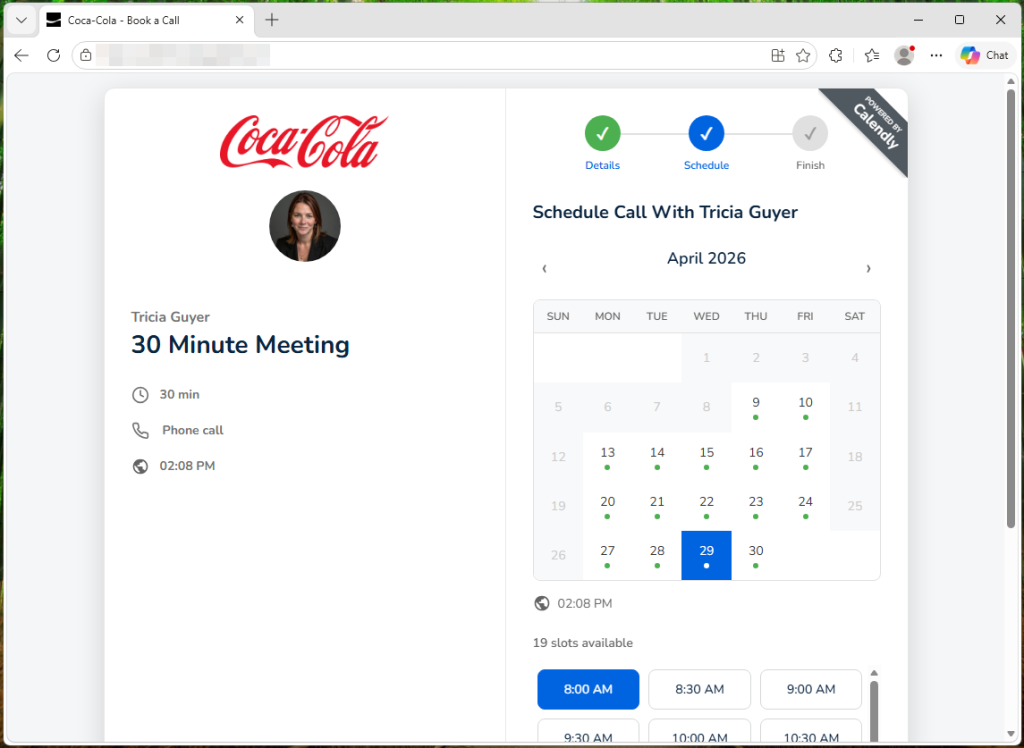 What made this one dangerous was the back end. After you enter your password, the page quietly polls the attacker's server every three seconds, waiting to be told which of four verification screens to show next: email code, authenticator code, SMS code, or Google phone prompt. That timing lines up with the attacker feeding your credentials into the real Google login in parallel and relaying whatever challenge comes back, so your two-factor code is captured while it is still good. The form even rejects personal Gmail addresses, because a corporate Workspace account is worth far more. The Ferrari sibling cast a wider net, hijacking the log in with Facebook button on a fake career portal to harvest social credentials instead. |
| What it teaches: a real pop-up can be dragged outside the window and survives when you minimize the browser. A fake one is stuck inside the page and vanishes with it. And two-factor is not a force field here; the code can be stolen live. |
CASE FILE 02The recruiter net that cloned thirty brands Tracked October 2025 into 2026 • Targets: marketing professionals with business email |
This one stands out for its patience. Researchers found a single operation impersonating recruiters at more than thirty well-known companies, among them Delta, Adidas, Netflix, OpenAI, and FIFA. The emails were personalized, addressing people by name and citing their actual current job title, and the campaign had been running quietly for months. A Google Careers variant opened with a disarming line: are you open to talk. It was aimed mainly at corporate inboxes, and the attackers filtered out non-business addresses on purpose. 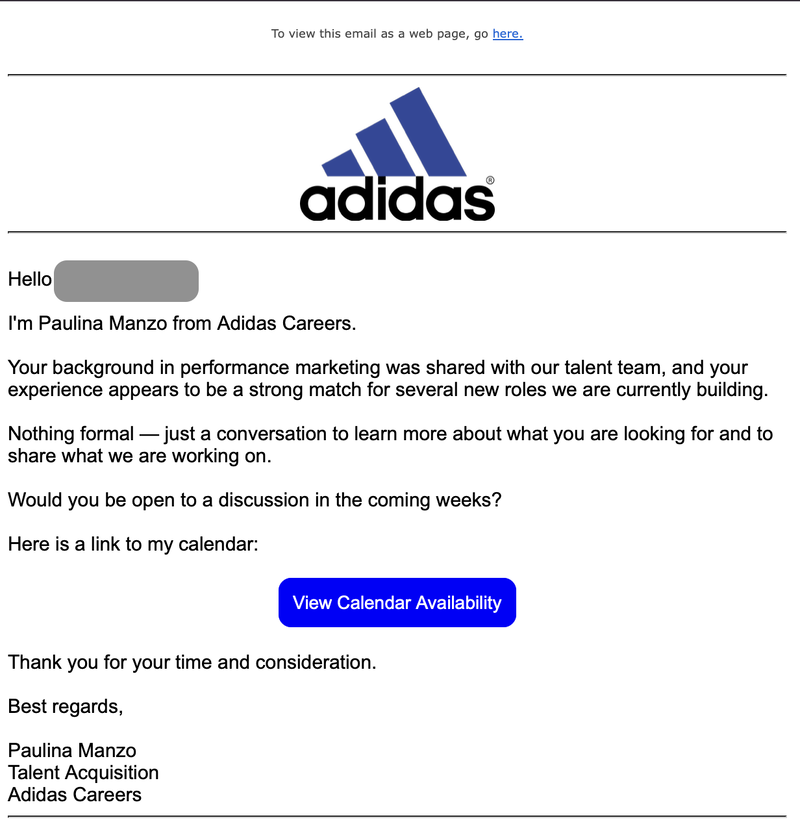 The clever part was the plumbing. Before you reached anything malicious, the interview link bounced you through genuine services, a Salesforce marketing platform and a real estate CRM called Wise Agent, so the early hops looked clean to you and to security scanners alike. Then came a fake Cloudflare verification page, a convincing Google Careers scheduler, and only at the very end the credential-stealing sign-in. The crew even split words like Google Careers into single-letter fragments in the code so filters could not read them. Around the same time, a phishing kit sold to other criminals, Sneaky2FA, adopted the same fake-popup trick for Microsoft logins, which tells you the technique has gone mainstream. |
| What it teaches: a message that knows your name and job title is not proof of anything. That data is cheap. And a trustworthy-looking web address early in a flow does not vouch for the sign-in page at the end of it. |
CASE FILE 03Operation Dream Job: when the fake recruiter is a nation-state Active since 2020, new waves through 2026 • Targets: defense, aerospace, aviation |
The most sobering case here is not run by petty criminals. Operation Dream Job is a long-running campaign tied to Lazarus, a hacking group linked to North Korea. The approach is the same social play the fraudsters use, only slower and better funded. Fake recruiter profiles reach out on LinkedIn with roles at brands people respect, invest weeks in building rapport, then move to steal credentials and plant malware. Early waves phished login details from job seekers with lookalike company sites; Bitdefender documented one attempt that pitched a crypto-exchange collaboration and, by bad luck for the attackers, landed in the inbox of one of its own researchers.  The 2026 waves that Check Point detailed went further. One decoy carried a Lockheed Martin job description. Victims were steered to install a trojanized document viewer that opened a booby-trapped file and quietly dropped a backdoor, paired with a Windows kernel vulnerability that Microsoft patched only in August 2026. The operators even used search engine optimization to float their fake vendor pages up the rankings, a grim reminder that it came up first on the search is not a safety check. The prize here is not one account. It is a foothold inside a defense contractor. |
| What it teaches: the most expensive attacks start with the cheapest trick, a friendly recruiter. If a hiring process ever asks you to download and run software just to read a job description, stop. |
What researchers and agencies are saying
Drawn from the people who track this for a living, paraphrased where the point matters more than the wording, and quoted only where the exact phrase earns its place.
“ The best defense is not spotting the fake. It is knowing that no legitimate hiring process will ever require you to authenticate through an unfamiliar page. Stefan Dasic Malware researcher, Malwarebytes ThreatLabs | “ Employment scams are making a comeback, and the pressure of a hard labor market is a big part of why people fall for them. Melanie McGovern Better Business Bureau |
“ The FTC data book puts job and employment scam losses at $501 million for 2024, roughly five times the 2020 figure. Reports tripled over the same stretch. Federal Trade Commission Consumer Sentinel data, 2025 release | “ Check Point assessed that Lazarus most likely reached its defense-sector targets through professional networks and messaging apps, the same channels real recruiters use. Check Point Research Operation Dream Job analysis, 2026 |
“ Companies like The Trade Desk now publish candidate warnings: they will never ask for payment to be hired, and recruiter mail should come from the official domain. Employer fraud notices The Trade Desk, Criteo, AppLovin | “ Sublime Security found the recruiter net ran for months undetected, hiding its phishing pages behind real marketing and CRM platforms to slip past scanners. Sublime Security Credential phishing investigation, 2025 to 2026 |
The red flags that give a fake job offer away
You do not need to identify the trick. You need to notice one of these and slow down. Any single flag is enough to stop and verify.
✘ You never applied An unrequested offer for a role you did not seek is the most reliable warning there is. Real recruiters almost always follow an application or a prior conversation. | ✘ A login you did not expect Any step asking for your existing Google, Microsoft, or Facebook password to book, apply, or verify. Scheduling a call never needs your email password. |
✘ The sign-in box behaves oddly A pop-up that cannot be dragged past the window edge, disappears when you minimize the browser, or has an address bar you cannot click or edit. | ✘ The whole thing lives on chat apps Hiring pushed entirely onto WhatsApp, Telegram, or Signal while the sender dodges official company email is a documented pattern in real fraud notices. |
✘ The email domain is almost right A recruiter writing from a public inbox, or a domain that is close but not the company's real one. Check the exact spelling of everything after the @ symbol. | ✘ Manufactured urgency Pressure to pick a slot or confirm today, before you have looked the role up independently. Urgency exists to stop you verifying. |
✘ Asked to install something Any request to download a special viewer, app, or archive just to read a job description. This is how the state-sponsored campaigns deliver malware. | ✘ Money to get money Fees for training, equipment, or background checks, or a system that shows earnings you must pay to withdraw. No real employer charges you to work. |
What to do if you already entered your password
If you got to the end of one of these and typed real credentials, move quickly and in this order. Speed matters more than embarrassment.
| 1 | Change that password now, from a device you trust Go directly to the real service by typing its address yourself, not through any link in the email. Change the password for the account you entered, and any other account that shared it. |
| 2 | Sign out everywhere and revoke active sessions For Google: myaccount.google.com then Security then Your devices. Do the equivalent in Microsoft or Facebook security settings so a stolen session is kicked out. |
| 3 | Reset your second factor Because live relay kits can capture a code, treat your two-factor setup as exposed. Re-register your authenticator and, if you can, switch to a passkey or hardware key that phishing cannot replay. |
| 4 | Tell your employer's IT or security team If it was a work account, report it immediately. A compromised corporate login is a doorway to the whole company, and they can watch for misuse and lock things down. |
| 5 | Report it and watch your accounts In the US, file at reportfraud.ftc.gov and, for internet crime, ic3.gov. Then watch email rules, sent items, and linked apps for anything you did not set up. |

Final Verdict
The instinct people trust is the thing being used against them
Across the campaigns researchers have dissected, the striking pattern is how little the victim usually does wrong. The communications manager who lost her work login was careful. She checked the sender. She hesitated. What beat her was not carelessness, it was a good page arriving at the exact moment she was hoping for good news. That is the whole design. These scams do not hunt for foolish people. They hunt for hopeful ones, and a job search is hope with your guard down.
Telling people to look for the signs no longer holds up, because the signs keep getting better and the fakes keep getting cheaper to make. The advice that does hold up is duller and more reliable: decide, right now, that you will never enter an existing password inside anything a recruiter linked you to. Not to book a call, not to apply, not to verify. If the job is real, it will still be there in a new tab you opened yourself.
Treat as hostile: any sign in to continue inside a job offer you did not initiate. The cost of being wrong is your whole account.
The people running the worst of these are patient, well-resourced, and in some cases working for a government. You will not out-spot them every time. But you can refuse the one thing all of them are actually after. Keep your password out of the recruiter's reach, and the most sophisticated login scam in the world has nothing to steal.