Fake virus warnings are easy to dismiss until one takes over the screen of someone who does not know what a browser tab is. To build this guide, the team behind it kept a disposable Windows virtual machine running on a second monitor for the better part of a year, clicked the kind of ads a sensible person never clicks, and let dozens of these alerts play out. The pattern repeated every time. Sirens. A robotic voice announcing that banking details were being uploaded. A Microsoft logo used in a way Microsoft never uses it. A phone number set in a font larger than anything else on the screen.
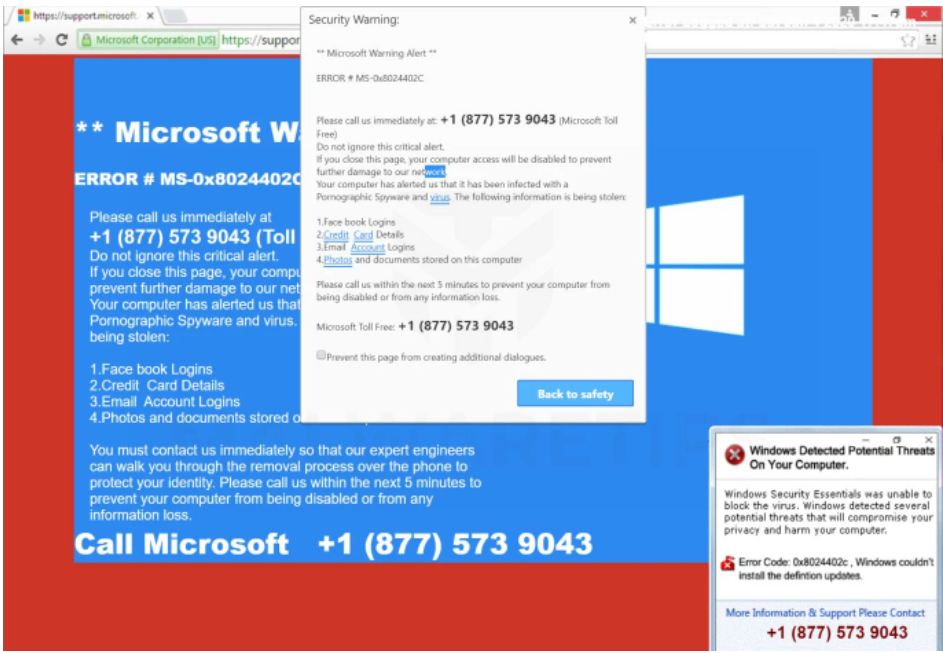
Two of those numbers were called from a spare line. Both times a calm, polite person asked for the "error code" on the screen, pointed to a website, and asked for a remote-access program to be installed. Neither asked a single question about what the computer was doing, because the computer was never the point. The call was the point.
That is the whole scam, and it deserves to be said plainly before anything else: a fake virus warning is a web page. It cannot scan your drive, it cannot read your files, and it cannot lock your computer. It can only lock a browser tab and hope you panic before you notice the difference.
The 20-second version
|
What these pages cost people

It is tempting to file fake virus alerts under "annoying". The FBI's numbers say otherwise. Tech and customer support fraud was the third most expensive crime category reported to the Internet Crime Complaint Center in 2025, behind only investment fraud and business email compromise.
$2.13B Tech and customer support fraud losses reported to FBI IC3 in 2025. The 2023 figure was $924 million. | 47,794 Tech support complaints filed with IC3 in 2025, up from 36,002 in 2024. | $1.04B Share of those 2025 losses reported by people aged 60 and over, across 21,333 complaints. | <10 min Average lifespan of a malicious site, per Google's Chrome security team. Blocklists cannot keep pace alone. |
Two things to keep in mind. First, these are reported losses, and the FTC repeatedly notes that most fraud is never reported. Second, the FTC keeps its own separate tally: in its 2024 to 2025 report to Congress on older consumers, adults 60 and over reported $159 million lost to tech support scams in 2024, and were far more likely than younger adults to report losing money to this category specifically.
How you end up on the page
Nobody types these addresses. Every fake alert in our testing arrived through a redirect, and the redirect almost always came from a source that looked ordinary a second earlier.
| Entry route | What it looks like | Why it works |
|---|---|---|
| Malicious ads | An ad on a real news, recipe or streaming site bounces the tab to the alert, sometimes without a click. | Ad networks rotate creatives faster than anyone can review them, and the host site looks legitimate right up to the jump. |
| Compromised websites | A small business site or blog with injected script that redirects a share of visitors. | The URL you clicked was real. The redirect happens after the page loads. |
| Fake download buttons | A "free PDF converter" or driver page with three green Download buttons, two of which are ads. | You were already expecting a pop-up of some kind, so one more does not register. |
| Push notifications | A site you clicked "Allow" on weeks ago now sends "Virus detected" toasts to your desktop. | The toast is delivered by the operating system's notification center, so it looks like a system message. |
| Paid search results | An ad above the results for "Microsoft support number" or "printer offline". | The FTC's 2024 complaint against Restoro and Reimage says the companies used Google search ads alongside fake Windows pop-ups. |

The push-notification route is the one people find hardest to believe, because the alert appears with no browser window open. It is still just a website. Revoking that one permission ends it.
Anatomy of a fake virus warning
Every page in our testing reused the same handful of parts, in slightly different orders. The recreation below is a composite of what the team saw, with each trick numbered in brackets. Once you can name them, they stop being frightening.
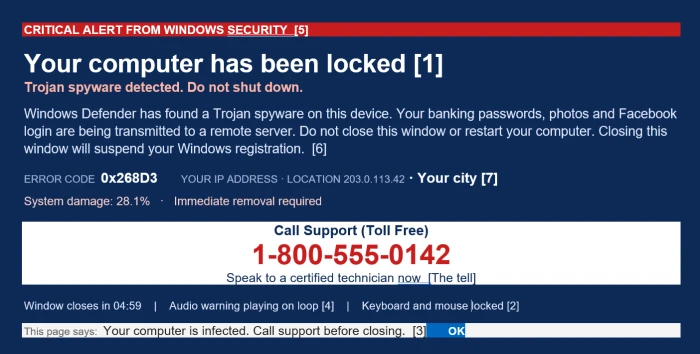
Composite recreation of a scareware page, built for this article. The phone number is a fictitious 555 number and the IP address is from a reserved documentation range. Bracketed numbers match the tricks below.
Trick 1 Full-screen takeover The page asks the browser for full-screen mode, and the address bar vanishes. Microsoft's own support guidance describes this exactly: the browser is forced full screen and shown pop-ups that will not go away, so it appears locked. Esc usually undoes it. | Trick 2 Locked keyboard and mouse Google's Chrome team names the keyboard lock API as one of the triggers that makes Chrome run its scam check. The tab is asking the browser to swallow keystrokes. Your machine is fine. |
Trick 3 Dialog loops A JavaScript alert reopens every time you dismiss it. Microsoft says Edge has a specific feature to stop these loops, which tells you how common they are. | Trick 4 The voice A synthesized voice reads the warning on repeat. Edge's scareware blocker mutes audio the moment it fires, because sound is what stops people thinking. |
Trick 5 Borrowed logos, invented numbers Defender shields, Apple marks, McAfee and Norton names, a threat count, a percentage. The FTC's complaint against Restoro and Reimage quoted pop-ups reading "System damage: 28.1%" with a warning of permanent damage within minutes. | Trick 6 A deadline and a threat "Closing this window will suspend your Windows registration." Windows has no such thing. The countdown exists only to shorten the time you spend thinking. |
Trick 7 Your IP and city on screen Any website can see your public IP address and guess your city from it. Showing it back to you is theatre, not evidence of a breach. | The tell The phone number Large, centered, often labeled toll-free. This is the only element the scammer cares about, and the one element a real alert never has. |
The one test that settles it Microsoft's support pages state that its error and warning messages never include phone numbers, and that any communication with Microsoft support has to be started by you. The FTC says the same about security warnings in general: a real one will never ask you to call. If the alert wants a phone call, it is not an alert. |
What happens after you dial
The page is loud. The call is quiet. That contrast is deliberate, and it is where the money is made. Here is the sequence, drawn from FTC court filings and FBI advisories.

The FBI's 2025 report credits joint operations with India's Central Bureau of Investigation for about 175 arrests in 2025 alone, most tied to call centers running tech support and government impersonation scripts.
- The intake - A calm voice, often with a case number ready before you have said anything. They ask for the "error code" on your screen so the interaction feels like a support ticket.
- Remote access - You are walked to a website to download a remote-control program. These are legitimate products used by real IT departments, which is why nothing on your PC objects to them.
- The staged diagnosis - With control of your screen, they open Event Viewer, run a command that lists network connections, or scroll through system logs. The FTC's complaint against Restoro and Reimage describes telemarketers presenting routine Event Viewer entries as malware and showing VirusTotal results that came from other computers entirely.
- The first charge - In that same case, "repair" software sold for $27 to $58, followed by technician services costing hundreds more, with some upsells reaching $500. The FTC recovered $26 million in the settlement.
- The escalation - For the largest losses, the FBI's "Phantom Hacker" advisory describes what comes next: the support imposter asks you to log in to your bank to "check for unauthorized charges", notes which account is largest, then a second caller poses as your bank and a third as a federal agency, all urging you to move money to a "safe" account. IC3 also counted roughly 725 complaints and $311.8 million in 2025 losses from courier scams, where victims handed cash or gold to someone at their door after tech support or government impersonation calls.
The refund call Weeks or months later, someone may phone offering a refund for the "support" you paid for. The FTC flags this as a second scam: the caller claims to have refunded too much and asks you to send the difference back, or asks for bank access to "process" the refund. |
How the money moves
Payment method is the strongest signal you have during a call. Scammers push channels that cannot be reversed. The 2025 IC3 report breaks down transaction types for tech support complaints, and cryptocurrency, wire transfers and card payments lead the list.
| Method | Why scammers push it | Can you get it back? |
|---|---|---|
| Cryptocurrency, incl. Bitcoin ATMs | Irreversible and fast. Kiosks let a victim convert cash in a store while still on the phone. | Rarely. IC3 logged 13,460 crypto ATM complaints and $389 million lost in 2025, with $257 million of that reported by people over 60. |
| Wire or ACH transfer | Moves large sums in one step. | Sometimes, if you call your bank immediately. IC3's Recovery Asset Team froze $679 million across 3,900 incidents in 2025, a 58% success rate. |
| Gift cards | Bought at any store, drained in minutes by reading the code aloud. | Occasionally, if you contact the issuer before the balance is spent. Keep the card and receipt. |
| Credit or debit card | Looks like a normal software purchase. | Often. Card networks can reverse the charge. Report it as soon as you realize. |
| Peer-to-peer apps | Treated like cash by the platform. | Difficult. Report to the app and your bank; success varies. |

Crypto kiosks are where a phone call turns into an irreversible loss. People over 60 accounted for $257 million of the $389 million lost through them in 2025.
Microsoft states it will never ask to be paid for support in cryptocurrency or gift cards. No legitimate support desk does.
Closing it without making things worse
The instinct is to click the page's own Close button. Do not. Every button inside the page is page content, and on several of the pages in our testing the "X" opened another dialog or triggered a download. Go around the page instead.
Windows 1. Press Esc, or F11, to leave full screen. If the address bar reappears, you were on a website all along. 2. Press Ctrl + Shift + Esc to open Task Manager, select your browser, and choose End task. If the mouse is unresponsive, Alt + F4 closes the active window. 3. Reopen the browser and decline any offer to restore your previous tabs. | Mac 1. Press Esc first to exit full screen. 2. Press Cmd + Q, or Option + Cmd + Esc to force quit if the browser will not respond. 3. If the page comes back on launch, quit again and hold Shift while reopening so previous windows are not restored. |
Once the page is gone
✓ Open your browser's site permissions and remove any unfamiliar site from the Notifications list.
✓ Review installed extensions and remove anything you did not add on purpose.
✓ Run a full scan with the security software already on the machine. Windows Security is fine for this.
✓ If the alert keeps returning across sessions, something on the device is reopening it: a notification permission, an extension, or bundled adware. Treat that as the actual problem.
What your browser already does about it
The reason these pages live for minutes rather than days is that the two biggest browsers stopped relying on lists of known bad sites and started watching page behavior on the device itself.
| Browser | Protection | How it works | Status |
|---|---|---|---|
| Microsoft Edge | Scareware blocker | A local machine-learning model uses computer vision to compare full-screen pages against thousands of real scam samples. On a match, Edge exits full screen, mutes audio and shows a warning with a thumbnail of the page. Nothing is uploaded unless you choose to report. | Announced at Ignite in November 2024, previewed from February 2025, on by default for most Windows and Mac PCs since late 2025. |
| Google Chrome | Enhanced Protection with Gemini Nano | When a page trips triggers such as the keyboard lock API, an on-device model reads the page and extracts its intent. Those signals go to Safe Browsing, which can return a full-page warning before you interact. | Shipped in Chrome 137 in May 2025. Requires Enhanced Protection, under Settings, Privacy and security, Security. |
| Other browsers | Reputation blocklists | The page has to be seen, judged and listed before it can be blocked. | Standard everywhere, but a site that exists for under 10 minutes can beat it. |
Both features are useful, and both still miss pages. Google's own blog post on the Chrome feature notes that the team is studying prompt injection and timing tricks that could bypass it. Treat browser protection as a seatbelt, not a reason to relax the phone-number rule.
If you already paid or gave access
Speed matters more than anything else in this section. The FBI's recovery team can only freeze money that has not yet moved on, and the transfers in these cases are often split across several accounts within hours.
First 15 minutes Cut the connection Disconnect the PC from the internet, uninstall the remote-access program, and change important passwords from a different device. Start with email and banking. | Paid by card Call the issuer Tell your bank or card company what happened and ask them to reverse the charge. The FTC says card payments can often be stopped or reversed if you act quickly. |
Paid by gift card Contact the card company Report the scam to the brand that issued the card and ask whether the balance can be frozen or refunded. Keep the physical card and receipt. | Wired money Request a recall, then file at IC3 Ask your bank for a recall immediately, then report at ic3.gov with full transaction details. IC3 uses those details to initiate freezes with the receiving bank. |
Gave remote access Scan and clean Update your security software, run a full scan, and remove what it finds. If they touched banking sites while connected, tell your bank that too. | Report it Three places ReportFraud.ftc.gov, ic3.gov, and Microsoft's report-a-scam page. Reports drive the raids: in December 2025, Indian authorities working with the FBI shut down a Noida call center tied to $48.7 million in IC3-reported losses from more than 600 US victims. |
Final verdict
After months of watching these pages, our verdict is one the security industry does not usually lead with: they are not clever. They are loud. Every trick in the list above is a way of making a browser tab feel like an operating system for the fifteen seconds it takes a frightened person to dial. The siren, the percentage, the keyboard that stops responding, the voice, none of it survives the Esc key.
What survives is the phone call. The people who answered the test calls were patient, unbothered and clearly working from a script refined on thousands of real victims. The $2.13 billion the FBI counted last year was not taken by hacking anyone. It was taken by talking.
So the defense is not a product, and it is not a setting. It is one sentence to repeat to the people in your life who are least comfortable with computers: a real security warning will never ask you to call a number. If it wants a phone call, close the browser and walk away. Everything else in this article is detail.
Testing was carried out on a disposable Windows 11 virtual machine and a spare Android handset between April and September 2026. No real payments were made.